My logo

FB

Showing posts with label Netphone. Show all posts

Saturday, December 3, 2011

How to root the ZTE Blade (SMART Netphone)

Hi there, I've had a lot of inquiries regarding the newest android phone from SMART, the Netphone701. This includes how to root the device. But what is "rooting" actually? And what can you get from a rooted phone?


Well, rooting your phone simply means being able to have administrative access (and therefore, total control) on your android phone. It's like having administrator rights on your windows pc or superuser access on linux machine. Android is an operating system for mobile devices such as smart phones and tablet computers. It consist of a kernel based on linux kernel. So, if you are familiar with Linux OS, working with android shell is like working with linux. It's not always necessary to have root access, but besides being cool (especially for tinker fairies like me), it allows you to install useful applications not available on non-rooted phone. One such application I like is the Titanium backup. Well, it's just another backup utility but since it requires root access, it can do more than just secure your backup, that's a complete backup of your apps and application data. If you visit the market often, you might have stumbled upon a really cool app but, it requires root access. If you wanna try it, read on.

Disclaimer:
If you should attempt to follow this guide, please note that the author will not be held responsible for whatever abnormal operation (software / hardware) your mobile device might experience after tweaking it. The procedure involves using soft wares from android development communities and maybe considered unknown or untrusted by your mobile operator. Also, please note that this procedure automatically voids the warranty of your phone, so if you're completely unfamiliar with what are you doing, I suggest that you don't try it.


OK, let's get it on.
First, you'll need these soft wares (I recommend downloading them from the links below).


1) rageagainstthecage-arm5.bin & 
2) Superuser package
http://wiki.cyanogenmod.com/wiki/ZTE_Blade_(Gen2):_Root_and_Recovery
3) ZTE Blade Windows Drivers
http://support.zte.com.cn/support/uploads/ZTE_Android%20USB_Driver_For_Microsoft_PC.rar
4) Android SDK 
Just follow the procedure on how to install adb shell. Alternatively, you can just google how to get adb server running on your pc, after all, you don't really need the whole SDK package if you're not an android developer.Read more here:


http://developer.android.com/sdk/index.html

I suggest storing all the files in one location, preferably the \tools folder of the SDK path.
     C:\Program Files\android-sdk_r10-windows\android-sdk-windows\tools
Now we're good to go.It's a relatively simple procedure if you have your pc setup just right. I provided some screenshots for easy reference. Just click on the pictures to enlarge.


First, set your phone debugging and unknown software installation options from the settings page. Make sure both options are checked.


Next, verify that adb server is properly installed. On the command line, type:
>adb start-server
This should display the output that looks like this:


Verify that the phone is connected and recognized by your pc. To do this, type the following commands on the command line.


>adb devices


This should display the output that looks like this:
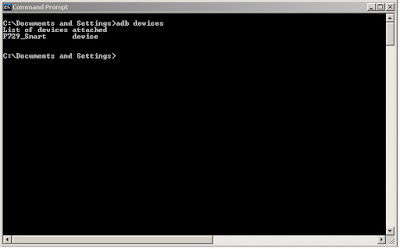
 
If the phone is connected and recognized by your pc,then run the following commands. Please look at the screenshot below for the summary and output of the following commands.

2)
>adb push rageagainstthecage-arm5.bin /data/local/tmp/
3)
>adb shell 
4)
$chmod 755 /data/local/tmp/rageagainstthecage-arm5.bin 
5)
$/data/local/tmp/rageagainstthecage-arm5.bin

Once the exploit finishes, in terminal, run the following commands: 

6)
>adb kill-server 
7)
>adb start-server 
8)
>adb shell 

NOTE: As you enter the adb shell, you should see a "#" at the command prompt. If you see a "$", then the exploit didn't work, please repeat steps 2-5. Else, proceed to the next step.

9) 
#cd /system
10)
#ls

NOTE: If you see xbin at the output, perform the next command,if not, proceed to step 12.

11)
#mv xbin xbin.bak
12)
#mkdir /system/xbin
#exit
>adb push su /system/xbin/ 
>adb shell chmod 4755 /system/xbin/su 
>adb push Superuser.apk /system/app/

Below are some screenshots of what we've done so far. These will show the commands and the output. Click on the picture to enlarge. As you may notice, the windows directory is different, that's because I opted to install the SDK files to a different directory.Just make sure that the required soft wares are in the current directory in the command line as you perform the procedure. 


Congratulations! you're  done. You now have root access on your Netphone. Verify this by installing root checker app by joeykrim from the android market. 


Now you can install apps which require root access. Just be sure to allow the application as it requires root access elevation.You now have the superuser app installed on your phone, click on it to see apps with root access.


Here are additional screenshots before and after the rooting procedure.


Installed titanium backup which requires root access.


Enjoy your rooted Netphone, please follow & comment.
God Bless!


https://web.facebook.com/theengineerisin

Saturday, October 1, 2011

Netphone Tips & tricks

 I just got my Netphone, and so, I'm already missing my Samsung Galaxy Tab. Why? because I can do all the things on my Netphone like the tab, so I prefer of using it more often. This unit definitely is a good one for the Smartnet / Netphone service, so I suggest you really must try it. It's both android so I had no problems with the Netphone taking over my tab. But for Iphone users, I think they'll be missing a lot of stuff.
 So, if you're a loyal Iphone user, would you just love it if you can have the same interface over the netphone? As we all know, Iphone and Android (Netphone) are very different phones so I thought of mixing the two flavors if it will work out. Turned out, well, maybe not perfect but it looks good. So here's a short video on how you can customize your Netphone's interface to look like an Iphone. Sorry for the crappy video, I'll try and improve on that on my future posts.


Here's some cool screenshots:


 So, there you have it. I hope you enjoy more  features of your Netphone. I'll post other tips and tricks to make the most out of your Netphone. That's all for now, good day.

Sunday, September 11, 2011

SmartNet & Netphone...

The newest service from SMART Communications, SmartNet, is finally here. This service is now available on the new Smart Netphone. Built on ZTE blade mobile unit, this service is bound to change the way subscribers use social networking and mobile data communications. Of course, basic services like SMS,Voice & MMS are included.

So what is SmartNet?


It's a Saturday, I should be at home trying to having some time with my little girl, but then, I'm in the office and it's all hands on deck. It's not something unusual for me, I've been in this business for more than ten years so it's just another saturday in the office. But this day is different, this marks a new beginning in mobile communications technology as we launch our newest service, SmartNet & the Smart Netphone. So what really is SmartNet?

I go around my workplace asking my office mates, "O, may smartnet account ka na ba?" then I get the usual reply, "Ano yun?". And so, I go on explaining for the next 60 seconds on the basic details of the service. Then I get comments like, "Talaga,ok yan ah, try ko nga!". You can visit our site by clicking on SmartNet link above.

Ano nga ba ang SmartNet?

 SmartNet is the newest Social Networking Service (SNS) from SMART. Along with the Netphone, this service offers a lot of convenience to mobile subscribers using social networking as their way of life. This is also available via Internet. The web interface offers full access and customizations but it is updated along with the widget running on the Netphone. Simply put, it's just another Facebook, Twitter or Google+ service, but there's more. Not only does it combine your social networks into one but it also comes with features offered only by the largest telecom company in the country. Using SmartNet, you can update your social networks with ease and convenience using the Netphone.It is built with SMART's own applications that makes complicated tasks easier with a touch of an icon. The technology behind this service is truly amazing. You'll be able to enjoy mobile chat, posting Twitter & Facebook updates for free (using Netphone messenger & Social Stream)* anytime, anywhere.

The NetPhone Interface:


 The Netphone homepage uses the SmartNet widget which shows your current updates. Information is updated along with your SmartNet profile on the Internet. A press of a button shows you your current balance and other info. Built-in icons make chatting, email, SMS and SNS updates a breeze. A press of a button shows you your current subscriptions and service status.

 Another cool feature of NetPhone is the Net Setting widget. This widget let's you control the connectivity of the phone so as to prevent unwanted data charges. A simple touch of an icon enables Internet or safe browsing mode.


 Of course, basic services like Voice call, SMS and MMS are available. Additional features like FX are also included. I will share additional details on these services, including  the overall user experience,browsing speeds & network related issues on my next post. More features will be available soon for the service is under continuous development. For now, I invite you to try it out.


The mobile unit. - NetPhone701


On a personal note, my overall impression is good if not the best for the choice of unit. This unit compares pretty good against my 7" Samsung Galaxy Tab.

Pros:

Don't be fooled by just looks, this phone has a lot of features considering it's only around Php9K in the market. It's actually a ZTE Blade unit.I like to agree on Sam Pinto's "this is one sexy phone". I like the fact that this this phone can do most of the things that I consider a "high end or high profile" phone can do. This unit is a 2G/3G multi-band (GSM 900/1800/1900 HSDPA 900/2100) phone. Weighs around 110g with bright and crisp 480 x 800 pixels, 3.5" AMOLED capacitive touchscreen display. Also comes with Wi-Fi, USB and bluetooth for connectivity. It has a 3.2MP camera which is enough for really good pictures in lit environments. It's equipped with 600 MHz ARM 11 processor, Adreno 200 GPU, Qualcomm MSM7227 chipset, running Android 2.2 Froyo OS. And to top it all, this unit also has GPS functionality,FM radio,150 MB of storage, 512 MB RAM, 512 MB ROM and an expandable 2G microSD memory card for storing music, videos and other files. One unique feature I really appreciate on this unit is USB and WIFI tethering, meaning this unit can share it's mobile data connection via USB connection or act as a Wi-Fi hotspot. Now how cool is that! And by the way, this unit can also play HQ YouTube videos and music sounds good enough.User Interface is the basic android stuff with home,back,menu,volume side keys and power/display keys. Battery life is on the average,but if you're a "tweaky" user like me, or if you love angry birds,then travel charger at hand is a must. By the way,this unit also charge via any USB port (but slower than the wall-charger), that's another good feature.

Cons:

Well, you can't just have it all. First of all, the camera has no built-in flash, so you won't be able to snap a pose with your friends while hanging out on a dim corner of your favorite bar.But hey,this is no camera (it's a phone). Another thing is some lack of responsiveness from the touchscreen though it may be capacitive. Sometimes,you have to really put a little effort to try and slide those menus up and down. But I think this is due to the fact that it only has a basic processor to accommodate all of what you're trying to do at the same time. GPS drains the battery easily so i recommend you use a mobile charger when using this device with the built-in navigator.

That's all for now, watch out for the latest updates on my future posts. Thanks!

*Terms and Conditions Apply